For HighLevel agencies
Your HighLevel workflow ran.
Did the customer journey actually work?
GoCheckLog checks what actually happened across the customer journey — contact, opportunity, appointment, conversation, and message delivery — so you can find where things broke without digging through HighLevel one screen at a time.
$10/month · $96/year
A workflow can finish successfully while the customer journey still fails.
A contact was created.
But did the opportunity follow?
The appointment existed.
But was it cancelled or deleted?
The email was sent.
But was it delivered?
When something goes wrong, figuring out what happened can mean searching through contacts, opportunities, conversations, messages and appointments one record at a time.
Journey Monitor brings that evidence together in one investigation.
Meet Journey Monitor
One investigation. Four things you get back.
- Journey
- Problem
- Evidence
- Next Step
Reconstruct the Journey
See one contact's journey across the contact record, opportunities, appointments, conversations, and messages — brought together from HighLevel's own records.
Find What HighLevel Shows
Failed sends, Do Not Disturb, contacts with nowhere to send to, calendar notifications switched off — GoCheckLog surfaces the failures HighLevel's records actually show and flags what it can't explain rather than quietly passing over it.
See the Evidence
Inspect the HighLevel records behind each result, including the provider's own error text. Claims are marked Observed or Inferred, so you can distinguish what the records show from GoCheckLog's reasoning.
Know What to Check Next
Get prioritized, numbered troubleshooting steps based on the evidence found — including the specific HighLevel screens to check — so you know where to continue the investigation.
See the journey. See the evidence. Know where to look next.
GoCheckLog brings the records behind one customer journey together, separates what HighLevel directly shows from what can only be inferred, and turns the evidence into prioritized troubleshooting steps.
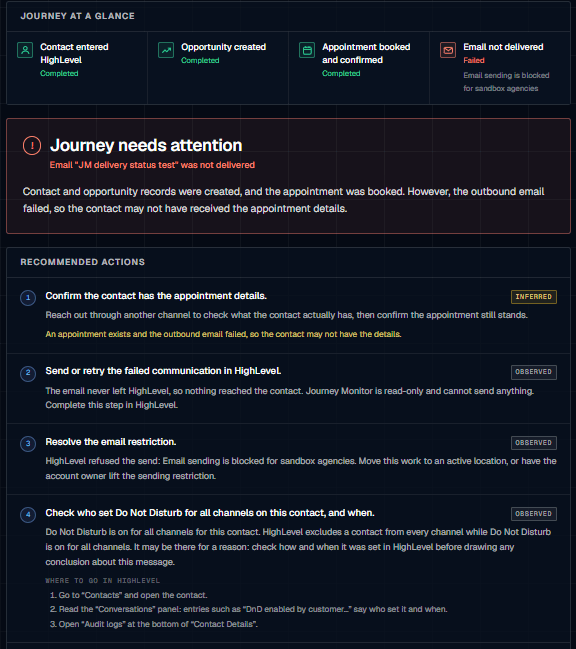
Built for troubleshooting, not another dashboard to watch.
Read-only by design
GoCheckLog investigates your HighLevel records without changing contacts, opportunities, appointments, conversations, or messages.
Evidence before conclusions
When HighLevel provides direct evidence, GoCheckLog shows it as Observed. When a conclusion depends on the available evidence, it's clearly labeled Inferred.
Actionable, not just informational
Findings lead to prioritized troubleshooting steps, including where to look in HighLevel when the next check has to happen there.
How an investigation starts
One Contact ID. One investigation.
Paste the HighLevel Contact ID, select Inspect Journey, and GoCheckLog reconstructs the records associated with that contact.
Your HighLevel data stays in HighLevel. Journey Monitor uses read-only access and does not create, change, or delete records.
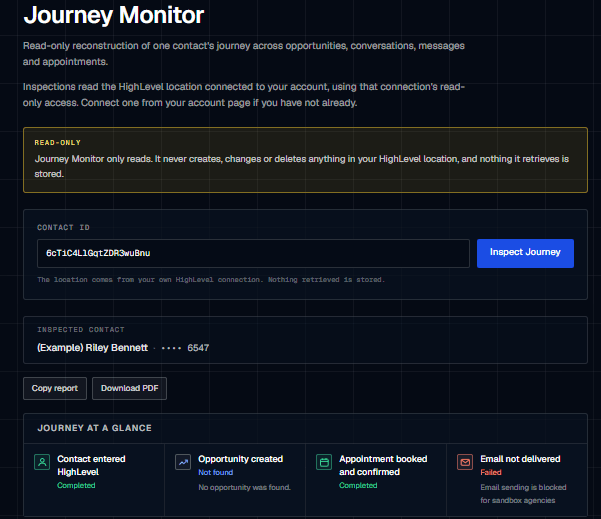
GoCheckLog doesn’t tell you what should have happened.It shows you what HighLevel says did happen.
Journey Monitor works from the records HighLevel makes available for the contact you’re investigating. When the evidence is direct, it’s labeled Observed. When GoCheckLog draws a conclusion from that evidence, it’s labeled Inferred.
No pretending an assumption is a fact.
Simple pricing. Full Journey Monitor.
Use GoCheckLog when you need to investigate what happened to a customer journey.
GoCheckLog
$10 / month
or $96 / year
Save $24 with annual billing.
- Journey Monitor investigations
- HighLevel record reconstruction
- Observed and Inferred evidence
- Prioritized troubleshooting steps
- Read-only access
- Nothing retrieved is stored
Questions before you connect?
Does GoCheckLog change anything in my HighLevel account?
No. Journey Monitor uses read-only access. It does not create, edit, or delete contacts, opportunities, appointments, conversations, messages, or other records.
Does GoCheckLog monitor my HighLevel workflows?
No. Journey Monitor investigates the records HighLevel makes available for a specific contact. It does not inspect your workflow configuration or determine what a workflow was supposed to do.
What do I need to run an investigation?
The HighLevel Contact ID for the customer you want to investigate. Journey Monitor uses that contact as the starting point for reconstructing the available journey records.
What's the difference between Observed and Inferred?
Observed means the finding comes directly from evidence in HighLevel's records. Inferred means GoCheckLog reached a conclusion from the available evidence. The distinction is shown so you can tell facts from reasoning.
Does GoCheckLog store the customer data it investigates?
No. Journey Monitor retrieves the records needed for the investigation, but the retrieved HighLevel data is not stored.
When a customer journey doesn’t look right, start with the evidence.
Investigate what HighLevel’s records show and know where to look next.